
Craft.io now integrates with Linear to give product teams an advantage
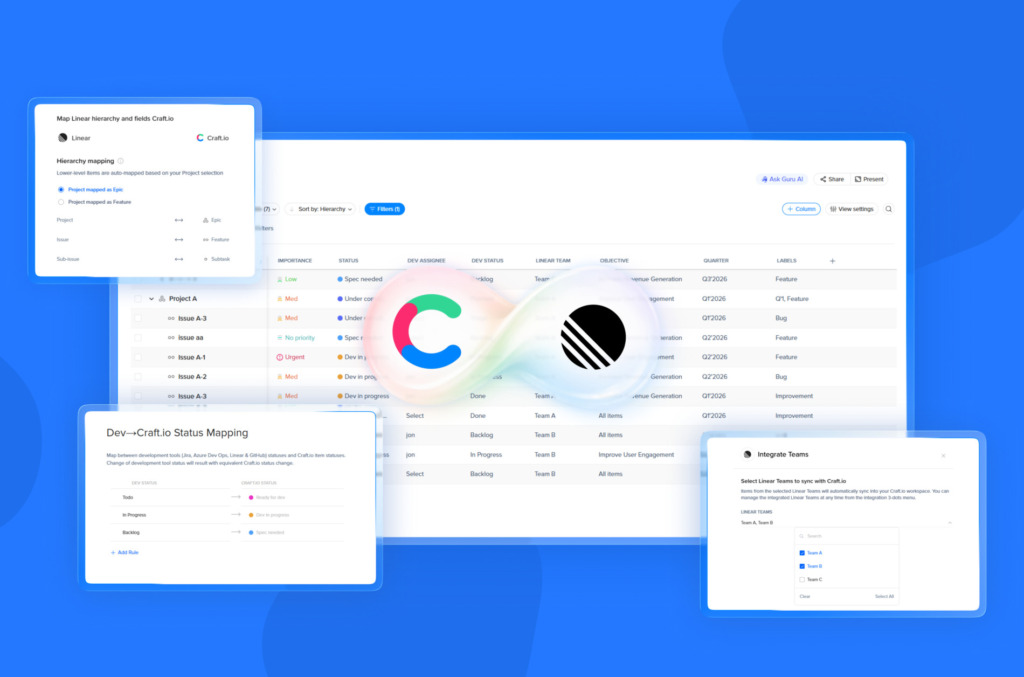
Connect high-level strategy with high-velocity execution to bridge the context gap and drive business growth.
In the modern product landscape—especially for AI-oriented and fast-moving engineering teams—velocity is the ultimate currency. Developers have flocked to Linear because it is lean, fast, and stays out of the way. However, for Product Managers and Marketing Leaders, execution is only half the battle. To gain a true competitive advantage, you need to ensure that every sprint is actually moving the needle on your long-term business goals.
The new Craft.io Linear integration bridges the gap between these two worlds. It allows product teams to maintain a deep strategic structure—including OKRs, prioritization scoring, and feedback management—while letting developers stay in their preferred, high-velocity environment.
Key Takeaways
- Strategic Alignment: Connect Linear’s execution to Craft.io’s roadmapping, prioritization, and feedback frameworks.
- Streamlined Mapping: Use an integration wizard to connect workspaces, set hierarchy, and perform initial data syncing.
- Real-time Updates: Use Webhooks for instant, automated updates that ensure your roadmap always reflects the current dev status.
- Two-Way Visibility: Prioritize and plan in Craft.io, then sync items directly to Linear as actionable projects and issues.
Balancing Strategic Depth with Engineering Velocity
Linear has earned its reputation as an exceptional Linear product management tool for execution, yet product leaders often require additional layers of context to manage complex portfolios. The Craft.io Linear integration offers the best of both worlds: it allows engineers to keep their “flow” in Linear, while PMs build the necessary strategic layers in Craft.io.
By choosing to integrate Craft.io with Linear, you can leverage custom fields for planning, manage customer feedback, and configure OKRs. This ensures that every ticket in the developer’s backlog isn’t just a “task”—it’s a clearly defined step toward a product goal. Developers get full context without slowing down, and leadership gets the visibility they need to drive growth.
Integration Setup and Mapping
The setup process is designed to be seamless. After generating an API key within your Linear workspace, our integration wizard guides you through a step-by-step connection. You can select specific Linear teams and configure how your work items map across platforms:
- Map Linear Projects to Craft.io Epics: Issues map to features (2-dot), and sub-issues to subtasks (1-dot).
- Map Linear Projects to Craft.io Features: Issues map to subtasks (1-dot).
Once the hierarchy is set, the integration supports automated updates for critical fields. For instance, Linear Priority maps to Craft.io Importance, while Status maps to Dev Status, and Assignee maps to Dev Assignee. This ensures that both the product and engineering leads are always looking at the same data.
Real-Time Accuracy via Webhooks
To keep your product roadmaps accurate without manual effort, you can configure a webhook within your Linear workspace. This allows for instant, two-way updates: any status change made by a developer in Linear will automatically reflect in the equivalent Craft.io work item.
Without a webhook, the integration facilitates one-way syncing from Craft.io to Linear. By enabling the webhook, you unlock a truly connected ecosystem. This move toward deeper automation is a core part of our mission.
To see more ways we’re empowering product teams, check out our latest roundup of the top 6 Craft.io features from 2025 that every product leader should know.
Pushing Strategy to Execution
The workflow is simple: perform your product discovery and prioritization in Craft.io—utilizing advanced scoring models or AI-assisted feedback analysis—and then transition the work.
With a single click of the sync button (located under the dev status and Linear ID fields), prioritized features or epics can be sent directly from Craft.io into Linear. For large projects, the bulk sync option allows you to deliver a detailed project plan to your dev team instantly.
Just as we have streamlined workflows with our integrations for Figma, InVision, and Adobe XD, this Linear connection ensures your technical output is never siloed from your strategic vision.
Explore our full range of integrations to see how Craft.io connects your entire stack.
How to Get Started
The Craft.io Linear integration is currently available to a closed beta group. We would love to have you participate and help shape the future of this feature.
- Step 1: Contact your dedicated Customer Success Manager to be added to the beta group.
- Step 2: Head over to your Workspace Settings > Integrations & Imports to begin the setup.
Ready to align your product strategy with engineering delivery? Enable the Linear integration today and turn your big ideas into real results.

FAQ
Why is the Craft.io Linear integration better than using Linear alone?
Linear is great for tasks, but it lacks deep strategy. This integration adds a strategy layer so you can connect daily dev work to high-level roadmaps and goals.
Does this integration help with faster decision making?
Yes. Real-time updates mean your roadmaps always show live progress. This gives you the advantage of making decisions based on actual data instead of old reports.
How does the Linear integration help with product planning?
It allows you to use Craft.io’s advanced prioritization tools on your Linear data. You gain an advantage by knowing exactly which Linear tasks will have the biggest impact on your goals.
Why is the Craft.io Linear integration an advantage?
It combines fast engineering with smart planning. The Linear integration ensures your team moves faster because everyone is aligned on the same goals across both tools. By choosing to integrate with Linear, you bridge the gap between execution and strategy.
