How to Connect Product Roadmaps to Jira: A Guide for Product Teams

Why Roadmaps and Jira Drift Apart
Most product teams carry two versions of the truth. The roadmap lives in a slide deck, a spreadsheet, or a dedicated roadmap tool. The actual work lives in Jira. Product managers update one, engineers update the other, and neither stays in sync for long.
The cost is real. When a feature slips in Jira but the roadmap still shows it shipping next sprint, stakeholders get false confidence. When engineering adds scope in Jira without it appearing on the roadmap, the product strategy quietly breaks. You end up in planning meetings reconciling two lists instead of talking about what to build next.
This gap is one of the most common frustrations for product teams using Jira for delivery but needing something purpose-built for product thinking. A product management platform with native Jira integration closes it by making the roadmap a live reflection of what engineering is actually doing.
The Real Cost of Managing Roadmaps Separately from Jira
Running your roadmap separately from Jira creates friction at every handoff. Here are the situations product managers run into most often:
- Manual status updates. Someone has to check Jira, then go update the roadmap. That task falls to whoever cares most, usually the PM, and it happens inconsistently.
- Misaligned timelines. Engineering moves tickets, closes sprints early, or re-scopes stories. The roadmap shows the original plan. Nobody notices until a release date passes.
- No connection between strategy and delivery. Jira tracks tasks, not goals. If you want to show stakeholders which features are tied to which OKRs or strategic themes, Jira alone cannot surface that. You end up building the story manually in a separate tool.
- Duplicate work on specs and feature definitions. Product writes a spec, and then engineers create Jira tickets that partly overlap with it. The two documents drift. By the time a feature ships, the spec and the Jira epic rarely match.
Jira is built for engineering delivery. It is very good at that. But it was not designed to hold a product strategy, manage a feature backlog with prioritization scores, or generate a roadmap view that a CPO can present to the board.
How a Product Management Platform Connects to Jira
craft.io connects to Jira so that the work you define in your product roadmap and backlog stays in sync with what engineering is tracking in Jira. The connection is native, not a third-party plugin or a CSV export.
Here is how the connection typically works in practice:
- Features link to Jira issues. A feature or initiative in craft.io can be linked to one or more Jira epics or stories. Status changes in Jira are reflected in craft.io without manual updates.
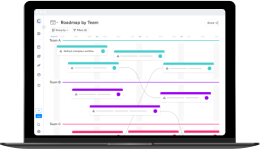
- The roadmap stays current. Because craft.io pulls delivery data from Jira, the roadmap shows actual progress rather than what the plan said three weeks ago. You can share a roadmap view with confidence that it reflects reality.
- Strategy sits above delivery. craft.io lets you attach OKRs, strategic themes, and prioritization data to features before they ever become Jira tickets. Engineering sees the context for what they are building, not just the task description.
- Specs and feature definitions live in one place. Product writes the spec in craft.io. When the feature is ready for development, the Jira ticket is created from that same record. The two stay connected rather than diverging.
The result is that product managers spend less time copying information between tools and more time on actual product decisions. For a Head of Product or CPO, it means the roadmap shown to leadership is the same one the engineering team is working from.
Using craft.io as an Agile Roadmap Tool Alongside Jira
Agile teams move fast, and roadmaps built in static tools cannot keep up. Priorities shift after each sprint review. Scope changes mid-quarter. A roadmap that was accurate on Monday is misleading by Friday.
craft.io is built for this environment. The roadmap view in craft.io is connected to the backlog, the prioritization data, and the Jira integration simultaneously. When a sprint closes and engineering marks items done in Jira, that progress shows up in the roadmap. When a feature gets deprioritized, the roadmap adjusts without a manual rebuild.
For teams evaluating a Jira product discovery alternative, the distinction is worth understanding. Jira Product Discovery handles discovery tasks within the Jira ecosystem, which means strategy and roadmapping still live inside a tool built around issues and tickets. craft.io is designed the other way: strategy and roadmapping are the center, and Jira is where delivery data flows in and out. For product managers who need to run prioritization, write specs, manage feedback, and present a roadmap to stakeholders, that difference matters.
You can learn more about how craft.io and Jira Product Discovery compare on the craft.io vs Jira Product Discovery overview.
Getting the Integration Running
Connecting craft.io to Jira does not require an IT project. The integration is set up from within craft.io and works with both Jira Cloud and Jira Data Center. Once connected, you choose which Jira projects to sync and map your craft.io features to the corresponding Jira epics or issues.
From there, the two tools stay in sync automatically. Product manages strategy, prioritization, and the roadmap in craft.io. Engineering works in Jira as they always have. The connection means neither team has to leave their primary tool to stay aligned.
If you want to see how the integration works for your team, you can book a demo or start a free trial directly from craft.io. The integrations page has details on what the Jira connection supports.