Product planning software for quarterly planning: a step-by-step workflow

Quarterly planning goes wrong in a predictable way. Feedback sits in one place, ideas in another, capacity in a spreadsheet, and the roadmap in a slide deck that is out of date by week three. Product planning software exists to put those pieces in one workflow so each step feeds the next.
This page walks through a quarter in five steps: review feedback, score ideas, check capacity, publish the roadmap, and track actual against planned. For each step, it shows where the work lives in a product planning tool like craft.io. If you want the broader theory first, our guide to the product planning process covers it.
Steps 1 and 2: review feedback, then score ideas
Step 1: Review feedback. Start the quarter with what customers and internal teams actually asked for. In craft.io you can invite people to give feedback on your product or sync existing data, so requests land in one place instead of across inboxes and chat threads. Read them as themes, not as a queue to work through in order. If your feedback intake is messy, these tips for managing feature requests help you tidy it before planning begins.
Step 2: Score ideas. Turn the themes into candidate features, then rank them with a consistent method rather than gut feel. The prioritization view uses built-in best practices so you work on the right strategic initiatives. Pick one scoring framework for the quarter and apply it to every idea. Mixing methods mid-meeting is how loud opinions beat evidence. If you are unsure which framework fits, read about product prioritization frameworks.
One habit worth keeping: link each scored idea back to a company objective. craft.io lets you connect OKRs to initiatives, epics, and features, so when someone asks why a feature made the cut, the answer is on the record.
Step 3: check capacity before you commit
This is the step most teams skip, and it is why quarterly plans slip. A ranked list is a wish list until you know what each team can deliver. Capacity planning in craft.io automatically visualizes what each team can take on, so you see the gap between ambition and available people before the roadmap goes out.
Work down your ranked list until capacity runs out, then draw the line. Items below the line are not rejected, they are next quarter’s candidates. Showing that line to stakeholders is far easier than explaining a missed commitment in week ten.
For a deeper look, see the capacity planning tool and the post on 7 essentials to simplify capacity planning.
Steps 4 and 5: publish the roadmap, then track actual against planned
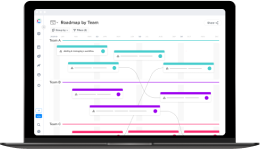
Step 4: Publish the roadmap. Once the scope fits capacity, turn it into a roadmap people can read. The roadmap view connects strategy to features, so the plan shows why each item is there as well as when it ships. Share it with engineering, sales, and leadership from the same source rather than exporting a new deck for each audience. If you are building your first one, this guide to building a great product roadmap is a good companion.
Step 5: Track actual against planned. A roadmap is only useful if you can see how reality drifted from it. The actual vs planned view tracks roadmap changes, so you can see what moved, what slipped, and what shipped as promised. Review it at mid-quarter, not just at the end.
That mid-quarter check feeds directly into the next planning cycle. Slips tell you whether your capacity estimates were too optimistic, and shipped work shows which scoring calls held up. Each quarter’s tracking becomes the starting evidence for the next quarter’s step one.
What to look for in product planning software
A product planning tool earns its place when it keeps all five steps connected. Check for these before you buy:
- Feedback and ideas live in the same system as the roadmap, so nothing is retyped.
- Prioritization uses a method you can explain to a skeptical stakeholder.
- Capacity is visible at planning time, not discovered after commitments are made.
- The roadmap can be shared without exporting to slides.
- You can compare what was planned with what happened.
If your team already works in delivery tools, look at how the planning tool connects to them. craft.io lists its options on the integrations page. You can see plans and plan details on the pricing page.
Quarterly product planning: common questions
What is the first step in quarterly product planning?
Start by reviewing feedback from customers and internal teams. In craft.io you can invite people to give feedback or sync existing data, so requests are in one place before you start scoring ideas.
Why should capacity be checked before publishing a roadmap?
A ranked list of features is only a wish list until you know what each team can deliver. Checking capacity first lets you draw a realistic line and avoid commitments you cannot keep.
How do I decide which ideas make the cut?
Pick one scoring framework for the quarter and apply it to every idea, then link each idea to a company objective. craft.io includes built-in prioritization best practices and lets you connect OKRs to features.
What does actual vs planned tracking show?
It shows how the roadmap changed over time, including what moved, what slipped and what shipped as planned. Reviewing it mid-quarter helps you adjust before the quarter ends.
Can one planning tool cover the whole quarterly workflow?
craft.io covers feedback, prioritization, capacity planning, roadmapping and actual vs planned tracking in one platform. That keeps each step feeding the next instead of being retyped between tools.