Product roadmap templates you can copy: timeline, swimlane and outcome-based
Three roadmap layouts, and which one to pick
If you need a roadmap that looks credible in front of leadership this week, start with the layout, not the tool. The layout decides what question your roadmap answers. A timeline answers “when.” A swimlane answers “who and which area.” An outcome-based roadmap answers “why.” Pick the wrong one and your executives spend the meeting asking for the view you did not bring.
Below are three layouts you can copy, what each is best for, and how to fill each one in with real initiatives. You can build all three as views over the same data in craft.io, so you do not have to maintain three separate documents.
Timeline roadmap: best for dates and dependencies
A timeline roadmap lays initiatives along a calendar, usually grouped by month or quarter. It is the layout most executives expect, and the one engineering and sales will ask about first.
Best for: release planning, launch coordination, and conversations where someone needs to know when a thing ships.
How to fill it in:
- List the initiatives you are committing to. Leave out ideas that are still being evaluated.
- Give each one a start and end window, not a single date. A window is honest about uncertainty.
- Mark the two or three dependencies that could move a date, such as another team’s delivery or a vendor decision.
- Keep the horizon short. The next quarter should be specific, and anything beyond it can be coarse.
Watch out for: timelines read as promises. If a bar sits in March, someone will plan around March. Label anything uncertain as such, and use the roadmap tool’s Actual vs Planned view later to show what moved and why.
Swimlane roadmap: best for multiple teams or product areas
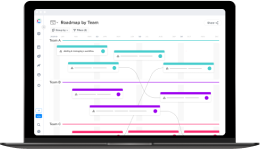
A swimlane roadmap splits the timeline into horizontal rows. Each row is a team, product area, or customer segment. You read across to see one group’s plan and down to see how the groups line up.
Best for: product orgs with several squads, product owners coordinating shared dependencies, and portfolio reviews where leadership wants to see balance across areas.
How to fill it in:
- Choose lanes that match how your organization is actually split. Squads or product lines work well. Avoid lanes that nobody owns.
- Place each initiative in exactly one lane, even if several teams touch it. Name the owning lane and note the others.
- Look down the columns for pile-ups. A quarter where one lane is overloaded and another is empty is a capacity conversation waiting to happen.
- Keep lane count manageable. Past five or six rows, the slide stops being readable.
Watch out for: swimlanes can hide strategy behind a tidy grid. Add a one-line goal to each lane so the rows connect to something bigger than a team name.
Outcome-based roadmap: best for strategy conversations
An outcome-based roadmap organizes work around the results you are trying to achieve rather than the features you plan to ship. Columns are usually Now, Next and Later, and each item is framed as a problem or goal.
Best for: executive and board discussions, early-stage planning, and teams that want to stay flexible about the solution while staying firm on the objective.
How to fill it in:
- Write two or three objectives for the period. Link them to your company or team OKRs if you have them.
- Under each objective, add the initiatives that support it. Write each as an outcome (“reduce time to first roadmap”) instead of a deliverable (“new onboarding screen”).
- Sort into Now, Next and Later by confidence and readiness, not by date.
- Be willing to leave something out. If an initiative does not move an objective, it does not belong on this view.
Watch out for: outcome roadmaps can feel vague to delivery teams. Pair the leadership view with a timeline or swimlane view underneath, so the same initiatives are traceable from goal to feature.
Setting these up in craft.io
craft.io is built around connecting strategy to features, so the three layouts above do not need to live in three files. You enter your objectives and initiatives once, then view them the way each audience needs. The roadmap feature links OKRs to initiatives, epics and features, and supports OKR-based roadmaps and dashboards.
A practical way to get something ready this week:
- Add your objectives and the initiatives that serve them.
- Prioritize with the built-in prioritization frameworks, so the order on the roadmap is defensible.
- Check team load with capacity planning before you commit dates.
- Pick the view that fits the audience: outcome-based for leadership, timeline for delivery, swimlane for cross-team reviews.
For the thinking behind the layouts, see our guide on how to build a great product roadmap. If your current roadmap process eats too many hours, this post on roadmaps that waste time covers the common causes.
Product roadmap template questions
Which roadmap template should I use for a leadership presentation?
An outcome-based roadmap usually fits best, because it ties initiatives to objectives and avoids committing to exact dates. Keep a timeline view ready as a backup for when leadership asks when something ships.
What is the difference between a timeline and a swimlane roadmap?
A timeline shows initiatives across a calendar and answers when work will happen. A swimlane splits that calendar into rows by team or product area, so you can see who owns what and spot where one group is overloaded.
Can I build all three roadmap layouts from the same data?
Yes. In craft.io you enter objectives and initiatives once and view them in the layout each audience needs, instead of maintaining separate documents.
How far ahead should a roadmap look?
Keep the next quarter specific and let anything beyond it stay coarse. Long-range items are better shown as themes or in a Later column than as dated commitments.
Should I include ideas that are still being evaluated?
For a timeline, no. Only list initiatives you are committing to. On an outcome-based roadmap, lower-confidence items can sit in Next or Later, clearly separated from committed work.