Roadmap Maker for Product Teams: What to Look for and How to Build One in Minutes
A roadmap maker is software that turns your plans into a visual, shareable roadmap that stays connected to the work behind it. If you are searching for one, you probably already have a roadmap somewhere: a slide deck, a spreadsheet, a board of sticky notes. The question is why that version keeps breaking, and what a purpose-built product roadmap tool would change.
This guide covers where slides and spreadsheets fall short, which features are worth paying for, and how to build a first shareable roadmap in Craft.io.
Slides and spreadsheets versus a purpose-built roadmap tool
A slide or a spreadsheet works while the plan is small and one person owns it. It starts to fail the moment other people depend on it.
- It goes stale. Nothing links the slide to the work in your delivery tool, so someone has to update it by hand. Usually nobody does, and the roadmap you present is not the roadmap the team is building.
- One version has to serve everyone. Executives want themes and objectives. Engineers want features and dates. Sales wants to know what is coming. A single slide or sheet can only be right for one of them.
- Changes are invisible. When a date moves, the old file is overwritten and the history is gone.
We have written more on this in why spreadsheets undermine product management efforts and on the hours that roadmap upkeep can eat. A purpose-built tool fixes the root cause: the roadmap is built from the same items your team plans and ships, so it does not drift.
Features that matter in a roadmap tool
Feature lists on vendor pages run long. These are the ones that decide whether a roadmap tool gets used or abandoned.
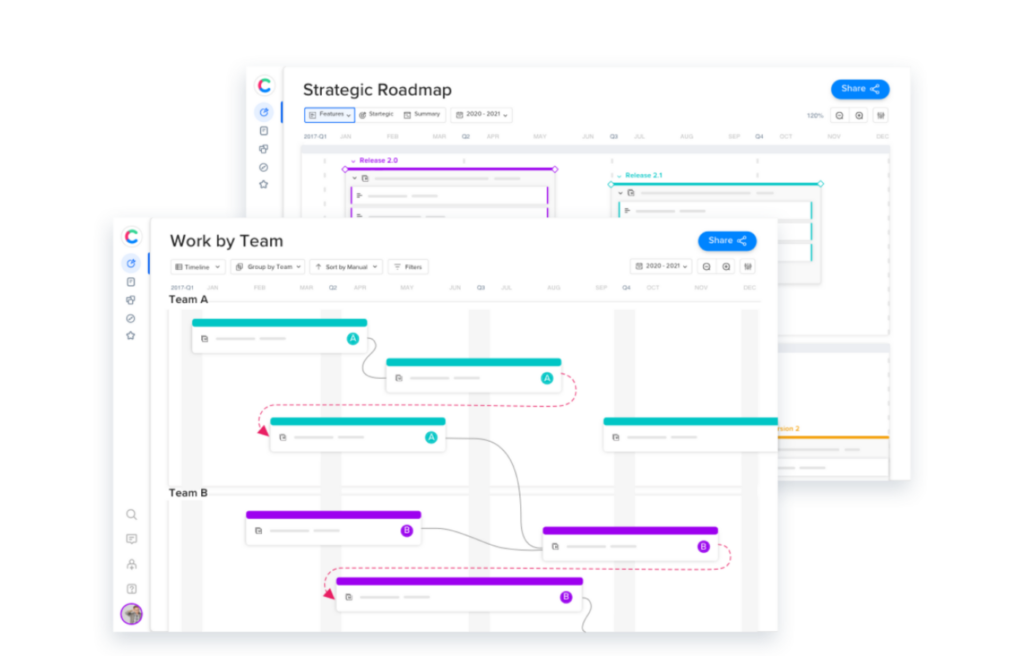
- Different views for different audiences. You should be able to show the same underlying plan as a strategic roadmap for leadership and a detailed one for delivery teams, without rebuilding it each time. A good agile roadmap tool also lets you share a view with people who do not have an account.
- A live Jira connection. If you are looking for a Jira roadmap tool, the test is whether work flows both ways. Items you plan in the roadmap should reach Jira, and status in Jira should show up on the roadmap. Craft.io lists Jira among its integrations.
- Progress tracking against the plan. A roadmap that only shows intent is a wish list. You want to see what shipped, what slipped, and by how much. Craft.io’s Actual vs Planned view is built for tracking roadmap changes over time.
- A link back to strategy. Features on the roadmap should trace to objectives, so you can answer the question of why something is on the roadmap. Craft.io supports this with OKRs linked to initiatives, epics and features.
How to build your first shareable roadmap in Craft.io
The steps below follow the general flow of the Craft.io roadmap. Menu names may differ slightly from what you see in your workspace.
- Start with objectives, not features. Add your company or team objectives first. This gives every item you add later a reason to exist.
- Add the work. Create the initiatives, epics and features you are planning, and link them to the objectives they support. If your backlog already lives in Jira, connect it so you are not retyping anything.
- Set timing. Place items on the timeline. Keep it honest: use broader time horizons for work that is not yet scoped, and exact dates only where you have them.
- Choose a view for your audience. Build one view for leadership and another for the delivery team. Both come from the same data, so a change in one shows in the other.
- Share it. Send the view to stakeholders instead of exporting a slide. They see the current plan every time they open it.
- Review against reality. Once work is moving, use Actual vs Planned to see where the plan and the delivery diverge, and bring that to your next planning conversation.
For the thinking behind the plan itself, see how to build a great product roadmap, and how a product roadmap tool works.
Making the case for a roadmap tool
If you are the one evaluating, you may also need to convince the person who signs off, usually a Head of Product, VP Product or CPO. The argument is rarely about features. It is about time spent maintaining decks, stakeholders working from outdated plans, and no clear record of why priorities changed.
Before you buy any roadmap maker, ask whether it connects to your delivery tool, whether it can show different audiences different views, and whether it tracks plan against actual. If the answer to any of those is no, you are buying a prettier slide. You can see how Craft.io handles each of them by checking the pricing and plans or booking a demo from the site.
Roadmap maker FAQ
What is a roadmap maker?
A roadmap maker is software for building a visual product roadmap that stays connected to the work behind it. Unlike a slide or spreadsheet, a purpose-built tool lets you show different views to different audiences and track progress against the plan.
Why not just use a spreadsheet or slides for a product roadmap?
Slides and spreadsheets are not linked to your delivery tool, so they go stale and need manual updates. They also tend to serve only one audience and lose the history of what changed.
What should I look for in a Jira roadmap tool?
Check that work flows both ways between the roadmap and Jira, so planned items reach Jira and status updates come back to the roadmap. Craft.io lists Jira among its integrations.
Can one roadmap serve both executives and engineers?
Yes, if the tool builds different views from the same underlying data. Leadership can see objectives and themes while delivery teams see features and timing, and a change in one shows in the other.
How do I track whether my roadmap is on plan?
Use a view that compares what was planned with what actually happened. In Craft.io, the Actual vs Planned view is designed for tracking roadmap changes over time.
Where should I start when building my first roadmap?
Start with objectives, then add the initiatives, epics and features that support them. Link each item to an objective so every roadmap entry has a clear reason to be there.